

Quick answer: A good resume should look clean, simple, and easy to scan. Use a single-column layout with your name and contact details at the top, then a short summary, work experience, education, and skills. Use a standard font like Calibri or Arial at 10.5 to 12 points, one-inch margins, consistent formatting, bullet points for achievements, and plenty of white space. Keep it to one page (two if you have 10+ years of experience) and save it as a PDF. Skip photos, graphics, tables, and skill bars.
A recruiter's first look at your resume is a lot like a first look at a dating profile: a few seconds, a quick scan, and a snap judgment about whether to keep reading.
The good news is that "what should a resume look like?" has a fairly clear answer in 2026. This guide covers the right resume format, layout and design rules, which sections to include, how long it should be, what to avoid, and examples for different career stages.
What Is the Purpose of a Resume?
Before we get to looks, remember what a resume is for. A resume is a marketing document, not a life story. Its only job is to show an employer, quickly, that you're qualified for a specific role and worth interviewing.
That's why appearance matters. Recruiters often skim a resume in seconds before deciding whether to read it properly. A widely cited eye-tracking study by the job site Ladders found recruiters spent an average of about seven seconds on their initial scan. Many employers also run resumes through applicant tracking systems first. So your resume has to look good to people and be readable by software.
Choose the Right Resume Format
There are three main resume formats:
- Reverse-chronological: lists your work history from most recent to oldest. It's the format most recruiters expect and the best choice for most people. See reverse chronological resumes.
- Functional: focuses on skills instead of work history. Recruiters often see it as a way to hide gaps, and it can confuse ATS, so use it rarely.
- Combination (hybrid): starts with a strong skills section, followed by reverse-chronological experience. A good fit for career changers and technical roles.
When in doubt, use reverse-chronological.
Resume Layout and Design Rules
Fonts
- Use a clean, standard font: Calibri, Arial, Helvetica, Garamond, Georgia, Cambria, Lato, or Roboto
- Body text: 10.5 to 12 points
- Your name: 18 to 24 points
- Section headings: 12 to 16 points, bold or in small caps
- Use one font (two at most) throughout
Margins and spacing
- One-inch margins on all sides (you can go to 0.5 inch if you're tight on space)
- Single line spacing (1.0 to 1.15)
- A little extra space between sections so each one stands out
Alignment
- Left-align your text. Centered body text is harder to scan.
- Keep dates aligned consistently, either right-aligned or on the same line as job titles.
Color
- Black text on white is always safe.
- A single accent color for your name or headings is fine and can look modern.
- Avoid bright colors, colored backgrounds, and low-contrast text.
Visual hierarchy
The reader's eye should go name → section headings → job titles → achievements. Use bold for job titles and headings, and regular text for details. If everything is bold, nothing is.
File type
Save your resume as a PDF unless the job posting asks for a Word document. PDF keeps your layout identical on every device.
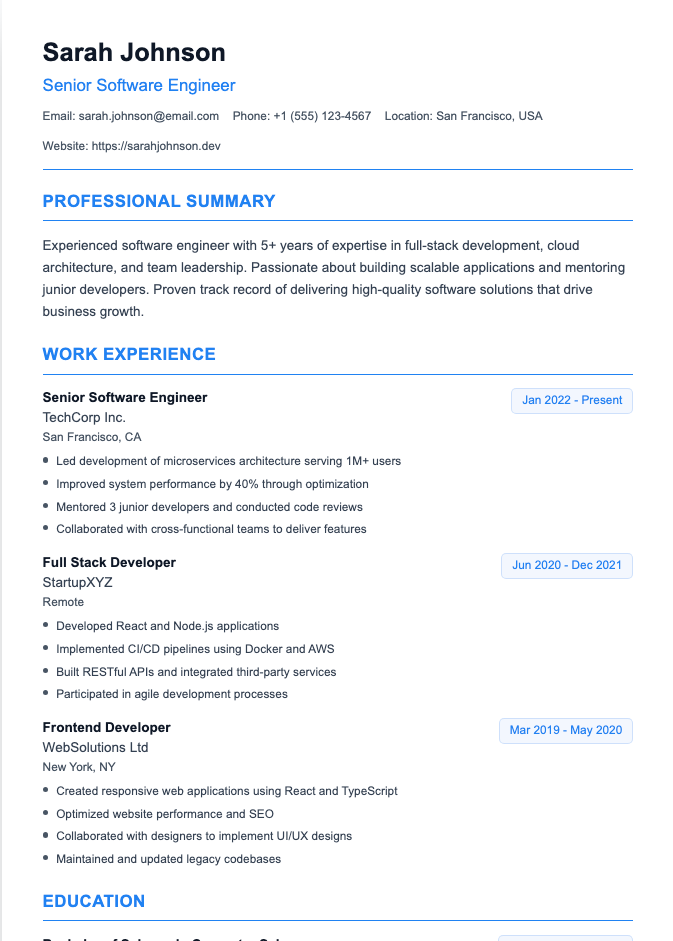
Resume Sections: What to Include and in What Order
1. Contact information
Name, phone number, professional email, city and state, and a LinkedIn URL. You don't need your full street address. See resume headings.
2. Professional summary (or objective)
Two to three sentences at the top that sum up who you are, your key strengths, and a standout achievement. Here's how to write a resume summary.
3. Work experience
Job title, company, location, and dates for each role, followed by three to six bullet points that focus on results. See work experience on a resume.
4. Education
Degree, school, location, and graduation year. Recent graduates can add GPA, honors, and relevant coursework. See how to list a degree on a resume.
5. Skills
Six to twelve skills that match the job description, mostly hard and technical skills. Find ideas in our skills for resume examples.
6. Optional sections
Add these only if they're relevant and you have room:
- Certifications and licenses
- Projects
- Volunteer experience
- Languages
- Awards
- Publications
- Hobbies and interests (rarely)
For the full order by career stage, see our guide to resume sections order.
How Long Should a Resume Be?
- One page: students, recent graduates, and anyone with less than about 10 years of experience
- Two pages: experienced professionals, managers, and people in technical fields with lots of relevant experience
- Longer: academic CVs, federal resumes, and some senior executive roles
Fill the page with relevance, not filler. A focused one-page resume beats a padded two-pager. More detail in how long should a resume be.
How to Write Bullet Points That Look Good
Bullet points make your resume scannable. Each one should:
- Start with a strong action verb (led, built, increased, reduced)
- Show a result, with a number if possible
- Fit on one or two lines
Before: Responsible for social media accounts.
After: Grew Instagram following from 2,000 to 18,000 in 12 months through a weekly video series.
See our resume bullet point examples for more.
What Should a Resume Look Like for Different Situations?
Students and recent graduates
- One page
- Education near the top, with GPA (if 3.5+), honors, and coursework
- Projects, internships, part-time jobs, and volunteering instead of long work history
- A short objective or summary
See how to write a resume with no experience.
Mid-career professionals
- One to two pages
- A strong summary, followed by detailed work experience with measurable results
- Education moves to the bottom, with no GPA
Technical roles
- A prominent skills section with specific tools, languages, and platforms
- Projects or a portfolio link
- Quantified technical results, like performance improvements, uptime, or cost savings
Corporate vs. creative roles
- Corporate (finance, law, consulting, healthcare): traditional, conservative design with black text and minimal color.
- Creative (design, marketing, media): a bit more personality is fine, like an accent color or a distinctive header font, plus a portfolio link. Keep the structure simple enough for ATS. See creative resume examples.
Common Resume Design Mistakes
- Photos. In the US, UK, and Canada, leave them off unless specifically requested.
- Graphics, icons, and skill bars. "Excel: 4/5 stars" tells a recruiter nothing and confuses ATS.
- Tables, text boxes, and columns. They often get scrambled by applicant tracking systems.
- Important information in the header or footer. Some systems skip it.
- Tiny fonts and cramped margins to squeeze everything onto one page.
- Inconsistent formatting: mixed date styles, bullet types, or fonts.
- Walls of text. Paragraphs instead of bullet points are hard to skim.
- Creative section titles like "My Journey" instead of "Work Experience."
- Typos. Nothing looks worse.

The 10-Second Resume Test
None of the top guides include this, but it's the fastest way to check your layout. Print your resume (or zoom out on screen), look at it for 10 seconds, then look away and answer:
- What job do I do, or want to do?
- Where did I work most recently?
- What's my single most impressive result?
If you can't answer all three from a glance, a recruiter can't either. Make your job title clearer in your summary, bold your job titles, and move your best achievement to the first bullet of your most recent job.
Then do one more check: copy all the text from your PDF into a plain text editor. If it comes out in a sensible order, an ATS will likely read it fine too. For more, see our ATS-friendly resume templates.
Resume Checklist Before You Send
- Name and contact details are at the top and correct
- One standard font, 10.5 to 12 points for body text
- One-inch margins, single-column layout
- Clear section headings in a logical order
- Bullet points start with action verbs and include results
- Dates are formatted consistently
- One page (or two if experienced)
- Tailored to the job description
- No photos, graphics, or tables
- Proofread, then proofread again
- Saved as a PDF with a clear file name, like "Firstname-Lastname-Resume.pdf"
Frequently Asked Questions
What does a good resume look like?
A good resume is clean, well-organized, and easy to scan in seconds. It uses a single-column layout, standard fonts, clear headings, consistent formatting, and achievement-focused bullet points tailored to the job.
Do employers care what your resume looks like?
Yes. A cluttered or hard-to-read resume can get skipped before anyone reads your experience. But a clean, simple design is all you need; fancy designs rarely help.
Should a resume be one page?
Usually, yes, especially if you have less than 10 years of experience. Experienced professionals can use two pages if all the content is relevant.
Should I put a photo on my resume?
Not in the US, UK, or Canada, unless the employer asks for one. Photos can introduce bias and often cause problems with applicant tracking systems.
What should a resume look like with no experience?
Lead with education, then list projects, internships, volunteer work, part-time jobs, and skills. Keep it to one page and use a simple, clean layout.
Is PDF the best format for a resume?
PDF is the best choice for most applications because it keeps your formatting consistent. Use a Word document only if the job posting specifically asks for one.
What is the best font for a resume?
Calibri, Arial, Helvetica, Garamond, Georgia, and Cambria are all safe, readable choices. Use 10.5 to 12 points for body text.
Get a Resume That Looks Right Automatically
Our Resume Builder handles the layout for you, with clean, ATS-friendly templates, consistent formatting, and the right fonts and spacing, so your resume looks professional in minutes.