

Quick answer: A resume ATS (applicant tracking system) is software that stores, parses, and lets recruiters search applications. It rarely "auto-rejects" you on its own. To make an ATS-friendly resume, use a simple one-column layout, standard section headings, a .docx or text-based PDF, and keywords from the job posting, then write for the human who reads it next.
You've likely heard the horror stories: "The ATS automatically rejected me because I didn't have the right keywords" or "You need an 85% match score to be seen by a human."
Here is the brutal truth: almost none of that is true.
Applicant Tracking Systems (ATS) are essentially digital filing systems. They help recruiters post jobs, track candidates, and search through applications. That's it. They are not sentient AI robot overlords making hiring decisions. (Most of them can barely handle a two-column layout. World domination is not on the roadmap.)
Harvard's career office covers the same fundamentals in its guide to creating a strong resume (opens in a new tab), including a useful list of action verbs.
What Is a Resume ATS, and How Does It Work?
When you click "Apply," your resume goes into the employer's ATS. Here's roughly what happens next:
- Parsing: The software extracts your name, contact details, job titles, dates, skills, and education into database fields.
- Storage: Your application is filed under that job opening, alongside everyone else's.
- Searching and ranking: Recruiters search the database with keywords ("Python," "project manager," "CPA") and filters. Some systems also rank applicants by how closely they match the job description.
- Human review: A recruiter opens the profiles that surface and decides who moves forward.
ATS use is widespread among large employers. Jobscan, as cited by Grinnell College's career office, reported that over 98.8 percent of Fortune 500 companies use ATS software. So yes, your resume will almost certainly pass through one. That's not a reason to panic. It's a reason to format sensibly.
To see which skills employers associate with a role, search the Department of Labor's O*NET OnLine (opens in a new tab) database by job title.
Myth #1: The Machine Rejects You
There is no universal "rejection algorithm" that automatically bins your resume because you missed a keyword. Most systems don't have the sophistication to "judge" a candidate like a human does.
Reality: When you are "rejected," it's usually because a human recruiter skimmed your resume, didn't see what they needed within seconds, and moved on. The "rejection" email is automated, but the decision was human.
The one real exception: knockout questions. If the application form asks "Are you authorized to work in this country?" or "Do you have a required license?" and your answer doesn't meet the requirement, the system can screen you out automatically. That's the employer's rule, applied by software, and it has nothing to do with your fonts.
You'll also see the claim that "75% of resumes are rejected by ATS." It gets repeated everywhere, usually without any traceable original study behind it. Treat it the way you'd treat a chain email.
Upload your CV and get your ATS score in 10 seconds
Paste the job description, upload your resume, and see exactly what the ATS will flag.
Drop your resume here
or click anywhere to browse
Takes about 10 seconds · No account needed
What we check
Keyword match
Skills the job asks for vs. what's on your resume
ATS-readable formatting
Layout that survives parsing by hiring software
Action verbs & impact
Strong, measurable bullet points
Common red flags
Issues that get resumes auto-rejected
Myth #2: The System Filtered You Out
The belief that an automated system rejected you is a distraction. The real issue is volume. Hundreds of qualified people apply every day. Even if you optimize for a perfect "score," you're just landing in a bigger pile.
The Reality: The "algorithm" is the hiring manager. If they don't see something to make them stop scrolling in the first few seconds, they move on. You aren't being filtered by a robot; you are being overlooked by a busy human.
What to do instead:
- Optimize for attention, not software.
- Lead with results to make your value clear immediately.
- Format for skimming. Humans don't respond to scores; they respond to clarity.

Myth #3: AI Screens Candidates
Many ATS platforms now include AI features that summarize or rank applications, so this is changing. But ranking is not deciding. In practice, a person still reviews candidates, sets the requirements, and makes the call. The systems sort; people judge.
That's good news. It means the same resume that reads well to a human will also do fine with the software.
How to Make an ATS-Friendly Resume
You don't need to "beat" the ATS. You just need to avoid confusing it. Here's what actually matters:
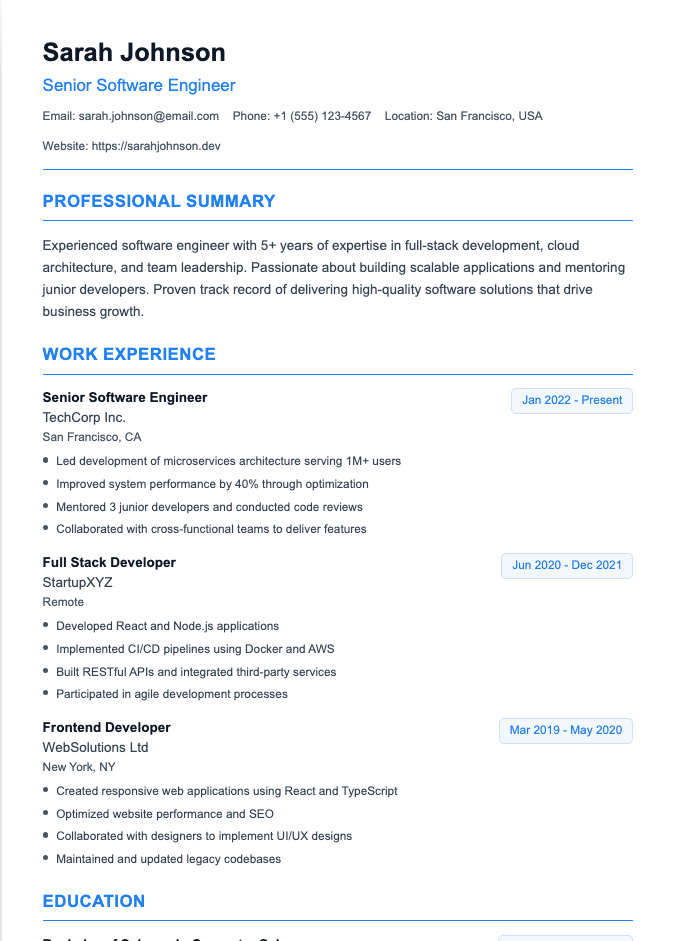
1. Use a Clean, One-Column Layout
Multi-column designs, tables, and text boxes can scramble the order your information is read in. A single column with clear headings is the safest choice.
2. Use Standard Section Headings
Call things what they are: Summary, Work Experience, Education, Skills, Certifications. "Where I've Made Magic Happen" is fun, but the parser won't know it's your work history. Not sure what order they go in? See our guide to resume sections order.
3. Keep Contact Details Out of the Header and Footer
Some systems skip header and footer content entirely. TopResume reported that in its own analysis of 1,000 resumes, the ATS failed to identify part of the job seeker's contact information 25% of the time. Put your name, email, phone, and LinkedIn in the main body.
4. Choose the Right File Type
A .docx file is the most universally parsed. A text-based PDF (exported from Word or Google Docs, not a scanned image) works with most modern systems. If the posting specifies a format, use it.
5. Add Keywords From the Job Posting
Mirror the exact terms for skills, tools, and certifications you genuinely have. Include both the full term and the abbreviation where relevant ("Search Engine Optimization (SEO)"). Our resume keywords guide shows how to find and place them.
6. Skip Images, Icons, and Skill Bars
Graphics carry no readable text. A five-star rating for "Excel" means nothing to a parser, and honestly, not much to a recruiter either.
7. Keep Bullets and Dates Simple
Use standard round bullets and a consistent date format (for example, "Jan 2024 – Present").
How to Check If Your Resume Is ATS Friendly
You don't need a paid service to run a basic test:
- The plain-text test: Copy your entire resume and paste it into a plain text editor. If the sections come out in a logical order and nothing is missing, most ATS will read it fine. (Some portals still ask you to paste a plain text resume, so this doubles as practice.)
- The upload test: Many application portals auto-fill fields from your resume. If your job titles land in the wrong boxes, your formatting needs work.
- An ATS resume checker: Free and paid checkers can flag missing keywords and parsing issues. Use them as a second opinion, not gospel. A "match score" is that tool's estimate, not a number recruiters see.
Should You Stuff Keywords to Pass the ATS?
No. Keyword stuffing, pasting the job description in white text, or repeating "project management" 14 times might fool a crude scan, but the human who opens your resume next will notice immediately. And they're the one who decides.
Use each important keyword naturally, in context, inside a real accomplishment. That works for both audiences.
Frequently Asked Questions
What is an ATS resume?
An ATS resume is simply a resume formatted so applicant tracking software can read it correctly: simple layout, standard headings, no graphics, and relevant keywords. It's not a special type of resume, just a well-organized one.
Do ATS systems automatically reject resumes?
Rarely on content alone. Automatic rejections usually come from knockout questions set by the employer, such as work authorization or a required license. Most resumes that "disappear" were reviewed and passed over by a person, or simply never surfaced in a recruiter's search.
Is a PDF or Word document better for ATS?
Both work with most modern systems. A .docx file is the safest choice for older systems, while a text-based PDF preserves your formatting. Always follow the employer's instructions if they specify one.
Can an ATS read a two-column resume?
Some can, but many parse columns out of order, mixing up your skills and job history. A single-column layout removes that risk.
Are ATS resume checkers accurate?
They're useful for spotting missing keywords and formatting problems, but each tool scores differently and none of them is the employer's actual system. Use the feedback, ignore the obsession with hitting 100%.
How do I get my resume past the ATS?
Use a clean format, standard headings, and the language of the job posting. Then make sure a human can grasp your value within seconds, because that's the real filter.
The Bottom Line
Stop trying to "beat the bot." Start trying to "impress the human."
Make sure the software can read your resume, then spend the rest of your energy on clear, results-driven content. If interviews still aren't coming, read why you're not getting hired. And if you want a layout that's ATS friendly by default, our Resume Builder includes clean, single-column templates like the Professional layout above, so you can focus on what you say, not on whether a robot can read it.