

Quick answer: Creative resumes use color, custom layouts, icons, and portfolio links to show personality and design sense, and they work best for design, marketing, media, and arts roles. Keep the standard sections (contact, summary, experience, skills, education), let design support the content instead of replacing it, and always keep a plain, ATS-friendly version for online applications.
A creative resume is a little like a statement outfit at a job interview. On the right person, in the right room, it says "I get this industry." In the wrong room, it says "I did not read the dress code."
This guide shows you when creative resumes help, which creative resume format to choose, what good examples have in common, and how to make one without breaking applicant tracking systems.
What Is a Creative Resume?
A creative resume is a resume where the presentation itself is part of the pitch. Instead of black text on a white page, it uses some combination of:
- Color (an accent color for headings, a sidebar, or a name banner)
- Custom typography (a distinctive heading font paired with a clean body font)
- Non-traditional layouts (two columns, timelines, a sidebar for skills)
- Visual elements (icons, skill charts, a personal logo)
- Links to work (portfolio, Behance, Dribbble, GitHub, a personal website, or a video reel)
The important part: a creative resume still contains everything a traditional resume contains. Your name, contact details, relevant experience, skills, and education all need to be there. Design is the wrapping paper, not the gift.
When Should You Use a Creative Resume?
Creative resumes are a strategic choice, not a default. Career centers like the University of Georgia Career Center recommend researching the employer first, because some organizations simply will not appreciate a heavily designed document.
Good fit:
- Graphic design, UX/UI, illustration, and animation
- Advertising, branding, and marketing
- Media, content creation, and social media roles
- Interior design, architecture, and fashion
- Small agencies, startups, and studios with a strong visual brand
- Applications you hand over in person or email directly to a hiring manager
Poor fit:
- Law, finance, accounting, and government roles
- Large corporations that require uploads to an online portal
- Highly regulated industries such as healthcare administration or banking
- Any posting that says "Word document only" or asks you to paste your resume into a form
A useful test: look at the company's own website and social channels. If their brand is bold and playful, a creative resume matches the room. If their homepage is navy blue and full of compliance language, go classic.
The Creative Resume Format That Actually Works
The most effective creative resume format is not chaos. It is a familiar structure with a few deliberate design choices layered on top.
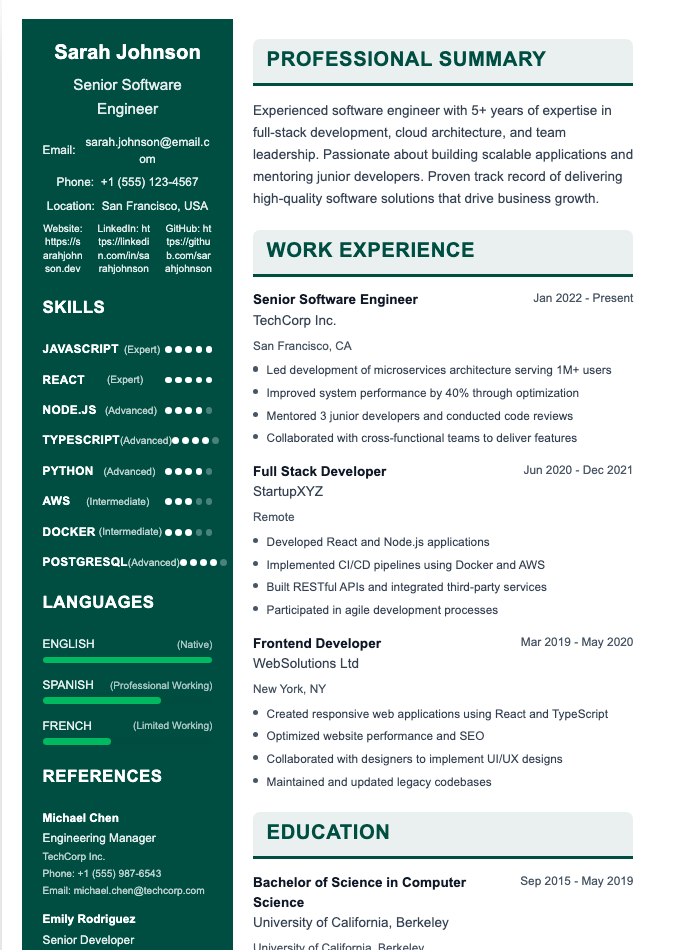
Recommended section order
- Header: Name (your biggest design moment), job title, email, phone, city, and a portfolio link.
- Short summary: Two or three lines about what you make and who you make it for. See our guide on how to write a resume summary.
- Experience: Reverse-chronological, with results-focused bullets.
- Selected projects or clients: Especially useful for freelancers.
- Skills and tools: Grouped by category (Design, Motion, Research, Software).
- Education and certifications.
Layout options
- Single column with color accents: The safest creative format. Works with most ATS software and still looks distinctive.
- Two-column with sidebar: Skills, contact, and tools in a narrow column; experience in the main column. Very popular, but harder for some ATS to parse.
- Timeline or infographic: Eye-catching for visual roles, but best kept for portfolios or direct submissions.
- Personal website or video resume: A great supplement, rarely a replacement for a one or two page document.
7 Creative Resume Design Tips
1. Use creative fonts for headings only
Pick one distinctive font for your name and section headings and a simple, readable sans serif for body text. Ten fonts on one page is not a style; it is a ransom note.
2. Limit your color palette
Two colors (plus black or dark gray for text) are plenty. Warm tones feel energetic; cool tones feel calm and trustworthy. Choose based on the role and the company's brand, and make sure text has strong contrast against its background.

3. Let design support the content
If your layout forces you to cut relevant experience, the design is working against you. Every visual decision should make the important information easier to find, not harder.
4. Lead with results, not duties
The strongest creative resume examples still read like strong resumes. "Designed a rebrand that lifted newsletter signups" beats "Responsible for design tasks." Our guide to resume bullet points that turn duties into results walks through the formula.
5. Link to your portfolio
A resume is a trailer, not the full movie. Include a short, clickable portfolio link in the header and, if helpful, mention two or three standout projects in the body.
6. Use white space generously
Skimmable beats crammed. Short bullets, clear margins, and breathing room around sections make a design look intentional.
7. Match your cover letter
Use the same header, fonts, and colors on your cover letter so your application looks like a matching set. Need help with the words? Read how to write a cover letter.
What Great Creative Resume Examples Have in Common
Look at enough strong creative resumes and the same patterns appear:
- A clear hierarchy. The name and title stand out; the reader knows where to look first.
- Personality in small doses. A custom section like "How I Work" or "Currently Learning" shows character without taking over the page.
- Grouped skills. Tools and abilities sorted into labeled categories instead of one long list.
- Tailored content. Section names and order shift to match the job they are applying for.
- Proof. Metrics, client names, awards, or links to real work.
Example: creative resume summary
Brand Designer · Portland, OR · portfolio.example.com
Brand designer with six years of experience building visual identities for consumer startups. I turn messy brand ideas into clear systems: logos, type, color, and guidelines teams actually use.
Example: creative "How I Work" section
How I Work
Research first, pixels second. I sketch on paper, test with real users early, and document every design decision so developers never have to guess.
Creative Resume Templates: Where to Find Them (and How to Choose)
Creative resume templates are everywhere: design tools, word processors, resume builders, and marketplaces. When comparing options, check that the template:
- Uses real text, not text baked into images or graphics
- Lets you edit colors and fonts to make it your own
- Exports to a clean PDF that keeps your formatting
- Offers a simpler variant you can use for ATS uploads
Templates are a starting point. Customize the color, swap a font, and rearrange sections so your resume does not look identical to the other hundred applicants who downloaded the same file.
Creative Resumes and ATS: How to Avoid Getting Filtered Out
(Switches to serious face.) This is where many beautiful resumes quietly fail. Applicant tracking systems read text, and they can struggle with:
- Text boxes, tables, and multi-column layouts
- Information placed inside images, icons, or charts
- Headers and footers that hold contact details
- Unusual section names like "My Journey" instead of "Experience"
Safer creative elements include colored headings, divider lines, shading, and a bold name treatment. These add personality without hiding your text.
The best strategy is to keep two versions:
- A creative version for portfolios, networking, email submissions, and in-person interviews.
- A clean, ATS-friendly version for online applications.
Learn more in our guide on the truth about ATS and see how a one-page resume can keep both versions tight.
How to Make a Creative Resume Step by Step
- Write your content first in a plain document. Get the words right before you touch design.
- Research the company and decide how creative the room allows you to be.
- Pick a template or layout that matches the role.
- Choose fonts and a two-color palette.
- Add one or two personality elements, such as a custom section or a logo-style name.
- Export to PDF to preserve formatting.
- Get a second opinion from a friend, mentor, or career advisor. Ask them what they noticed first.
- Create your ATS version by removing columns, icons, and graphics.
Frequently Asked Questions
Are creative resumes a good idea?
They can be, in the right industry. Creative resumes work well for design, marketing, media, and other visual fields, especially when you send them directly to a person. For conservative industries or large online portals, a clean traditional resume is usually safer.
Do creative resumes pass ATS?
Heavily designed creative resumes often do not parse well, because ATS software struggles with columns, text boxes, and text inside graphics. Light creative touches like colored headings and dividers are generally fine. Keep a plain version for online applications.
What should a creative resume include?
Everything a traditional resume includes: contact details, a summary, work experience, skills, and education. Add a portfolio link and, if relevant, a projects or clients section. The design should make this information easier to scan.
Should I put a photo on a creative resume?
In the US, UK, and Canada, photos are generally not expected and many recruiters prefer you leave them off to reduce bias concerns. Some countries and some creative fields are more accepting of them. When in doubt, leave the photo for your portfolio or LinkedIn.
What file format should I use for a creative resume?
Submit a PDF unless the employer asks for something else. PDFs keep your fonts, colors, and layout intact on any device. If a posting requests a Word file or plain text, send your simpler version instead.
Can I use a creative resume for a non-creative job?
You can add subtle touches, such as an accent color or a refined font, to almost any resume. Full infographic or highly visual layouts are a risky choice for traditional roles. Match the level of creativity to the company culture.
Build a Creative Resume That Still Gets Read
Want a resume that looks distinctive but still reads cleanly? Our Resume Builder offers a Creative template alongside Professional, Modern, and Minimal designs, with AI help on bullets and summaries, so you can switch between a bold version and an ATS-safe version in a few clicks.