

Quick answer: The heading for a resume is the block at the top with your full name, phone number, professional email, city and state, and LinkedIn URL (plus a portfolio link if relevant). Your resume also needs clear section headings like "Work Experience," "Education," and "Skills" so recruiters and ATS software can find everything fast.
Two things people mean when they search for a "resume heading":
- The resume header: your name and contact details at the very top.
- Section headings: the labels that divide your resume into parts.
Both are small. Both are easy to get wrong. And both can quietly cost you an interview if a recruiter can't find your phone number or an applicant tracking system can't figure out where your experience starts. This guide covers both, with copy-ready resume header examples and a list of safe section headings.
What Is the Heading on a Resume?
The heading on a resume (often called the header) is the first thing anyone sees. It tells the reader who you are and how to reach you. It's not the place for personality or a life story. It's the place for clean, correct, clickable contact details.
A good header does three jobs:
- Identifies you with your name in the largest text on the page
- Makes contact easy with one phone number and one email
- Adds credibility with a LinkedIn profile or portfolio
Think of it as a business card glued to the top of your resume. Nobody has ever been hired because of their header, but plenty of people have been passed over because of a typo in their email address.
What to Include in Your Resume Header
Must-haves
- Full name. First and last name, in the biggest font on the page (often 18–24 pt). Use the name you go by professionally. A middle initial is optional.
- Phone number. One number you actually answer, with a voicemail greeting you wouldn't be embarrassed by.
- Professional email. Ideally some version of your name, like jordan.lee@gmail.com. Not partyking2009@whatever.com.
- Location. City and state (or city and country) is enough. Recruiters use this to check commuting distance or time zones.
Good to include
- LinkedIn URL. Customize it first so it reads linkedin.com/in/jordanlee instead of a string of random numbers. Need help with the profile itself? See our LinkedIn headline examples.
- Portfolio or website. Essential for designers, writers, developers, photographers, and anyone whose work can be shown.
- GitHub. For software and data roles.
- Professional title or headline. A short line under your name, like "Senior Data Analyst" or "Registered Nurse | ICU." It tells the reader in one glance what you do.
What to leave out (in the US)
- Full street address. City and state is plenty. Your full address is unnecessary and a privacy risk.
- Photo. Not expected in the US, UK, or Canada, and can introduce bias. (Some countries in Europe and Asia do expect one, so check local norms.)
- Date of birth, age, marital status, or nationality. Not relevant to your ability to do the job.
- The word "Resume" at the top. The reader knows. It's like writing "Sandwich" on your sandwich.
- Multiple phone numbers or emails. Pick one of each.
- Your current work email or phone. Using your employer's contact details to job hunt is a risky move.
Resume Header Examples
Here are resume header examples you can copy and adapt. Separate items with a simple divider like a vertical bar or bullet.
Standard professional header
Jordan Lee
Marketing Manager
Chicago, IL | (312) 555-0147 | jordan.lee@email.com | linkedin.com/in/jordanlee
Student or recent graduate
Priya Patel
Computer Science Graduate
Austin, TX | (512) 555-0193 | priya.patel@email.com | linkedin.com/in/priyapatel | github.com/priyapatel
Creative professional
Marcus Rivera
Brand & Visual Designer
Brooklyn, NY | (718) 555-0128 | marcus@riveradesign.com | riveradesign.com
Remote job seeker
Elena Kowalski
Remote Customer Success Lead
Based in Denver, CO (Mountain Time) | (720) 555-0164 | elena.k@email.com | linkedin.com/in/elenakowalski
Relocating candidate
Samuel Okafor
Financial Analyst
Relocating to Seattle, WA (June 2027) | (614) 555-0172 | samuel.okafor@email.com | linkedin.com/in/samuelokafor
Two-page resume (header for page 2)
Jordan Lee | jordan.lee@email.com | Page 2
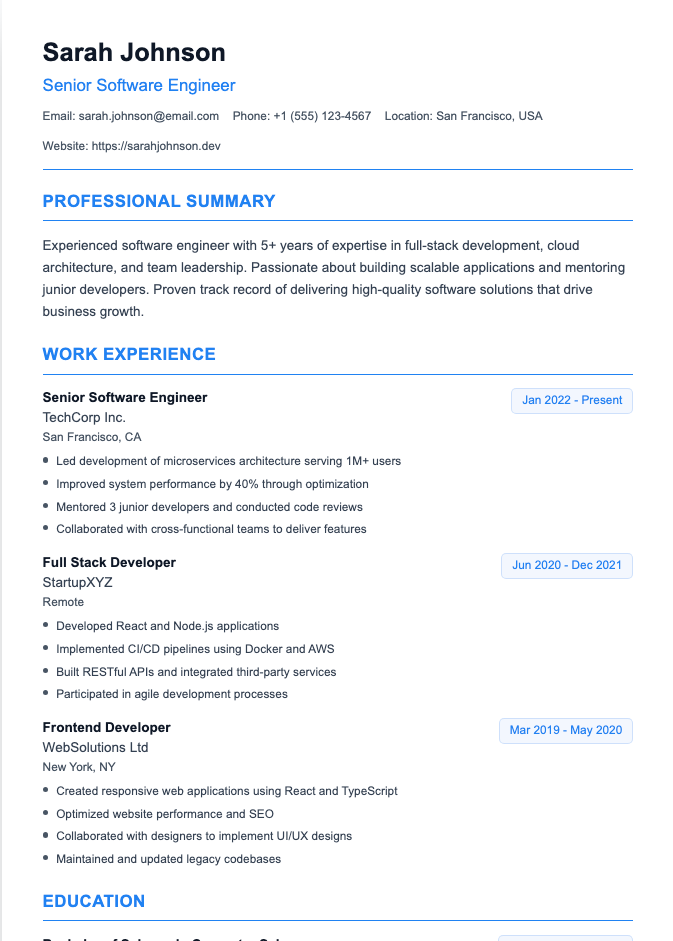
Resume Header Formatting Tips
- Make your name the largest text on the page, and bold it.
- Keep contact details on one or two lines. Small, readable text (10–12 pt) works fine.
- Align it with the rest of your resume. Left-aligned or centered both work; just be consistent.
- Put contact details in the body of the document, not inside the Word or Google Docs "header" area. Some applicant tracking systems skip that area, which means your phone number could vanish.
- Hyperlink your email, LinkedIn, and portfolio in the PDF version so recruiters can click straight through.
- Double-check every character. Then check again. A wrong digit in your phone number makes the rest of your resume pointless.
For more on ATS-safe formatting, see the truth about ATS.
Common resume header mistakes
- An outdated email or phone number copied from an old resume file
- A LinkedIn URL that doesn't match the name or job history on your resume
- Contact details buried in a sidebar or text box, where some ATS software reads them out of order or not at all
- A tiny name that's the same size as your bullet points, so the reader has to hunt for who you are
- A job title that doesn't match the role you're applying for. If you're applying to be a project manager, "Aspiring Everything" isn't helping. Use the title of the job you want (if you're qualified) or your current title.
- Too many links. LinkedIn plus one portfolio is plenty. Five social profiles turn your header into a link directory.
Resume Section Headings: Why They Matter
Now for the other kind of heading. Section headings are the labels that split your resume into parts. They matter for two reasons:
- Recruiters skim. Clear headings let them jump straight to experience or skills without reading every line.
- ATS software sorts by heading. Applicant tracking systems look for familiar section names to figure out which text is a job, which is a degree, and which is a skill. An unusual heading like "My Professional Journey" can cause content to be misfiled or missed.
The safest rule: be boring with your headings, be impressive with your content.
Standard Resume Section Headings (and Safe Alternatives)
Use one of these for each section. The first option is usually the safest.
Contact information
Usually doesn't need a heading at all. Your name at the top makes it obvious.
Summary
- Professional Summary
- Summary
- Career Summary
- Profile
Students sometimes use "Objective" or "Career Objective" instead. Learn more in our guide to writing a resume summary.
Experience
- Work Experience
- Professional Experience
- Experience
- Employment History
- Relevant Experience (great for career changers who want to group related roles)
Education
- Education
- Education & Training
- Academic Background
Skills
- Skills
- Technical Skills
- Core Competencies
- Key Skills
Optional sections
- Certifications (or Licenses & Certifications)
- Projects
- Volunteer Experience
- Awards & Honors
- Publications
- Languages
- Professional Affiliations
Headings to avoid
- "About Me" (vague and casual)
- "Where I've Been" or "My Journey" (cute, but confusing to software)
- "Stuff I'm Good At" (please don't)
- "Miscellaneous" or "Other" (signals you didn't know where to put something)
How to Format Section Headings
- Make headings bold and slightly larger than body text (1–2 points bigger is enough).
- Use the same style for every heading: same font, size, color, and capitalization.
- Pick one capitalization style: ALL CAPS, Title Case, or Sentence case. Don't mix.
- Add a little space above each heading so sections don't crowd each other.
- A thin line under headings can help separation, but skip heavy graphics and icons, which can confuse older ATS software.
- Use real text, not images, for every heading.
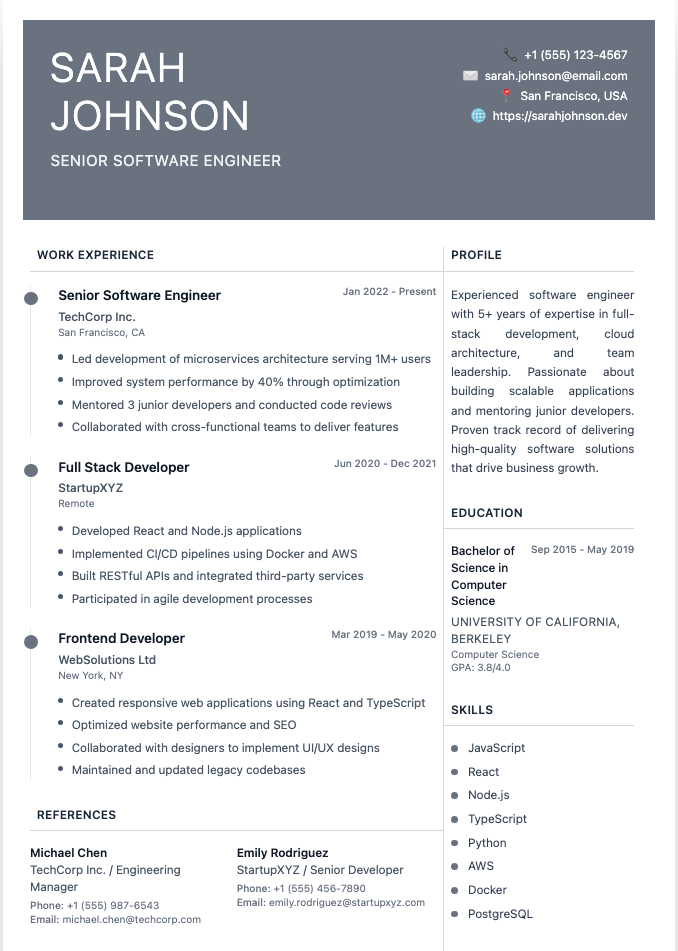
Which Headings Should Your Resume Have?
Most resumes need these core sections:
- Header (name and contact info)
- Professional Summary
- Work Experience
- Education
- Skills
Then add optional sections only when they strengthen your application for this specific job. A certification section for a nurse? Essential. A languages section for a role with international clients? Helpful. A hobbies section for a senior accountant? Probably not.
The order of these sections depends on your career stage. Recent grads often lead with education, while experienced professionals lead with work experience. Our guide to resume section order covers every scenario.
When Are Creative Headings Okay?
Creative headings can work when:
- You're in a creative field like design or advertising
- You're handing your resume to someone in person
- You're sending it directly to a person rather than through an online application
Even then, keep them understandable. "Selected Work" instead of "Experience" is fine for a designer. "Adventures in Pixels" is a gamble. If your resume goes through an online application system, stick with standard headings.
Frequently Asked Questions
What should the heading of a resume include?
Your full name, phone number, professional email address, and city and state. Add your LinkedIn URL and a portfolio or website if relevant. A short professional title under your name is optional but helpful.
Should I put my address on my resume header?
You don't need your full street address. City and state is enough for most jobs, and it protects your privacy. For remote roles, you can list your state or time zone instead.
Should I write "Resume" at the top of my resume?
No. Your name should be the title of your resume. Writing "Resume" wastes valuable space and looks dated.
What are the main section headings on a resume?
The core headings are Professional Summary, Work Experience, Education, and Skills. Optional sections include Certifications, Projects, Volunteer Experience, Awards, and Languages.
Should I put my contact info in the document header?
It's safer to put it in the main body of the document. Some applicant tracking systems don't read the header and footer areas of Word or Google Docs files, so your contact details might get lost.
Should my name be in all caps on a resume?
It can be. All caps, title case, or a bold larger font all work. What matters is that your name is the most prominent text on the page and the style matches the rest of your design.
Do I need a header on the second page of my resume?
Yes, add a simple header with your name and "Page 2" (and optionally your email). If pages get separated, the recruiter still knows whose resume it is.
Get Your Header and Headings Right Automatically
Getting the details right takes a few minutes, but they're the minutes that make sure a recruiter can actually call you back. Our Resume Builder gives you clean, ATS-friendly headers and standard section headings out of the box, so you can spend your energy on the content that gets you hired.