

Quick answer: To parse a resume means to use software (a resume parser) that reads your file, pulls out details like your name, contact info, job titles, dates, education, and skills, and saves them as structured fields in an applicant tracking system. Recruiters then search and filter those fields instead of reading every file.
Every time you upload a resume and the application form magically fills in your job history (or hilariously puts your street address in the "Job Title" box), you've met a resume parser.
Here's how resume parsing works, what parsers extract, where they go wrong, and how to write a resume that parses cleanly. For the bigger ATS picture, see the truth about ATS.
What Is a Resume Parser?
A resume parser (also called a CV parser) is software that converts an unstructured document, your resume, into structured, machine-readable data, usually JSON or XML. That data then lands in an ATS or recruiting CRM as a candidate profile.
Parsers are built into ATS platforms like Greenhouse, Workable, and Zoho Recruit, or sold by vendors like Textkernel, RChilli, and HrFlow.
CV parsing and resume parsing are the same thing. The name just depends on the region.
What resume parsing is not
A parser does not decide if you're qualified. It structures your data. Screening and matching are separate steps, done by people or other software that uses the parsed data. So your goal isn't to "beat" the parser. It's to make sure it reads you correctly.
How Resume Parsers Work (Step by Step)
Different products vary, but how resume parsers work generally follows the same path:
- Ingest the file. Your resume arrives through an online application, email, job board, or integration.
- Extract the text. Text-based PDFs and Word files expose their text directly. Scanned or image-only files need OCR (optical character recognition) to turn pixels into letters, and some systems may not handle them at all.
- Identify sections and entities. Using natural language processing, the parser finds sections (experience, education, skills) and entities (employers, job titles, dates, schools, emails, phone numbers).
- Normalize the data. Dates, phone formats, locations, titles, and skills are standardized so they can be searched and compared.
- Create or update the candidate record. The parser may match on your email or phone to avoid creating a duplicate profile.
- Make it searchable. Recruiters can now search by keyword, filter by skills or location, and rediscover you for future roles.

Types of resume parsing technology
Older parsers rely on rules and keyword patterns ("a line with an @ is probably an email"), sometimes plus statistical models. Newer AI-based parsers use machine learning and language models, which handle varied layouts better but can still misclassify sections or infer details you never wrote.
What Information Does a Resume Parser Extract?
Most parsers try to capture:
- Identity and contact: name, email, phone, location, LinkedIn or portfolio links
- Work history: employers, job titles, start and end dates, descriptions
- Education: schools, degrees, fields of study, graduation dates
- Skills: hard and soft skills, tools, languages
- Credentials: certifications, licenses, memberships, clearances
- Extras: summary, projects, volunteer work (varies by system)
Behind the scenes:
On your resume: Marketing Coordinator, Brightline Foods, Chicago, IL, Mar 2023 – Present
In the database: Job title = Marketing Coordinator · Employer = Brightline Foods · Location = Chicago, IL · Start = 2023-03 · End = Current
Done right, a search for "marketing coordinator Chicago" finds you. Done wrong, you become "Chicago, IL, Present" with zero years of experience.
Why Resume Parsing Goes Wrong
Parsing errors are usually about layout, not you:
- Image-based files. Scans have no text layer to read without OCR.
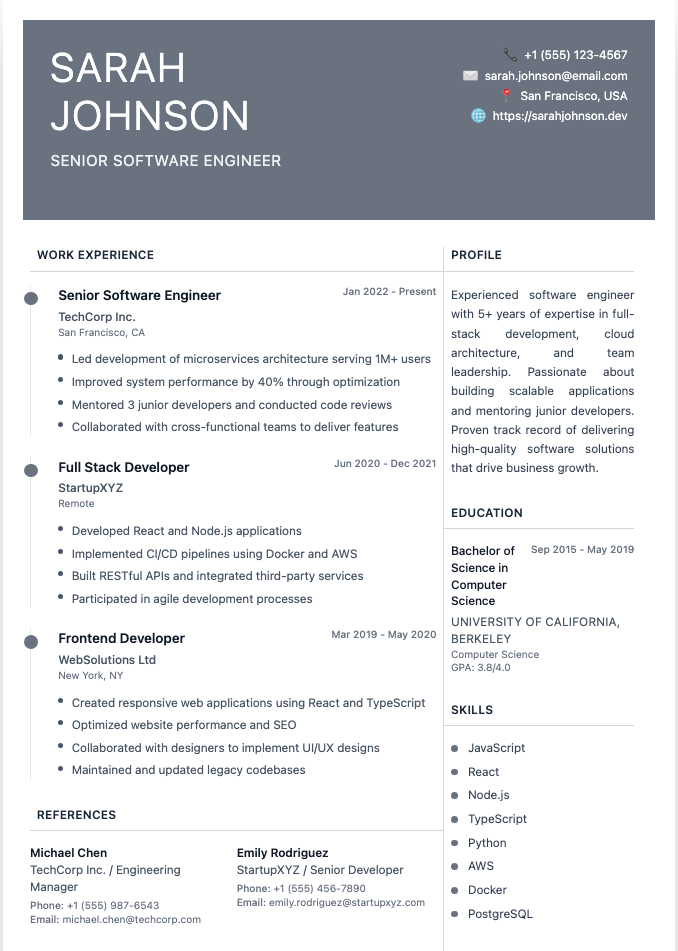
- Multi-column layouts. The parser may read across columns and attach dates to the wrong employer.
- Tables, text boxes, icons, and graphics. Content can be skipped or jumbled.
- Contact details in the header or footer. Some systems ignore those areas.
- Creative section names. "Where I've Been" is charming. "Experience" is parseable.
- Ambiguous dates. Overlapping roles, promotions, and missing months confuse timelines.
- Unusual jargon. Write "information analysis" when the recruiter searches "data science," and you may not surface.
When parsing fails, you're often stuck retyping your whole work history into the form. Nobody's favorite Tuesday.
How to Write a Resume That Parses Cleanly
You don't need a boring resume. You need a predictable one.
- Use a single-column layout with clear section breaks.
- Use standard headings: Summary, Experience, Education, Skills, Certifications. See our guide to resume sections order.
- Put contact details in the body, not the header or footer. Our resume heading guide shows clean formats.
- Write dates consistently, such as "Mar 2023 – Present," next to each job.
- Send a text-based PDF or .docx unless the posting asks for something else. Never a scan or a photo.
- Mirror the job posting's terms where they're true for you. Our resume keywords guide covers how without stuffing.
- Skip skill bars, icons, and text boxes. Write skills as plain words.
How to Test Your Resume With a Parser
You can preview roughly what a resume parser sees in a few minutes:
- The copy-paste test. Open your PDF, select all, copy, and paste into a plain text editor. If the text comes out scrambled or missing, a parser will likely struggle too. (Our plain text resume guide walks through this.)
- The highlight test. Try selecting a single word in your PDF. If you can't, the file is an image.
- Try an online resume parser or ATS checker. Many tools show the extracted fields. Treat it as a preview; every system parses differently.
- Watch the auto-fill. When a form pre-fills from your resume, check what landed where.
Frequently Asked Questions
What does it mean to parse a resume?
It means software reads your resume and breaks it into labeled fields such as name, email, job titles, dates, education, and skills. Those fields are stored in an ATS so recruiters can search and filter candidates.
Is CV parsing the same as resume parsing?
Yes. The underlying process is the same, and the term mostly depends on the country. CV parsing is more common in the UK and Europe, resume parsing in the US.
Can resume parsers read PDFs?
Most can read text-based PDFs, the kind you export from Word or Google Docs. Image-based PDFs, such as scans or files saved as pictures, have no text layer and may need OCR or fail entirely. If you're unsure, a .docx is a safe alternative.
Does a resume parser reject candidates?
No. A parser structures your data; it does not judge whether you're qualified. Rejections come from recruiters, knockout questions, or screening rules applied afterward, though a bad parse can make you harder to find in searches.
Can a parser read a two-column resume?
Sometimes, but it's a common failure point. Parsers can read across both columns line by line and mix up your content. A single-column layout is the safer choice for online applications.
Build a Resume Parsers Can Read
The easiest way to pass a parser is a clean, single-column structure with standard headings. Our AI Resume Builder gives you ATS-friendly templates and helps you write keyword-rich bullets, so the parser reads you right and the recruiter wants to call.