

Quick answer: A two-column resume splits the page into a narrow sidebar (contact details, skills, education, languages) and a wider main column (summary and work experience). It looks modern and fits more on one page, but some applicant tracking systems read columns out of order, which can scramble your information. Use a two-column resume when a person will see it directly (networking, email to a hiring manager, design roles), and a one-column resume for online applications through job portals.
Two-column resumes are the skinny jeans of resume design: they look sharp, everybody seems to have one, and they're not always comfortable for the software that has to read them.
This guide explains what a two-column resume is, the pros and cons, how it compares with a one-column layout, what to put in each column, and how to use one without hurting your chances.
What Is a Two-Column Resume?
A two-column resume divides the page vertically into two sections:
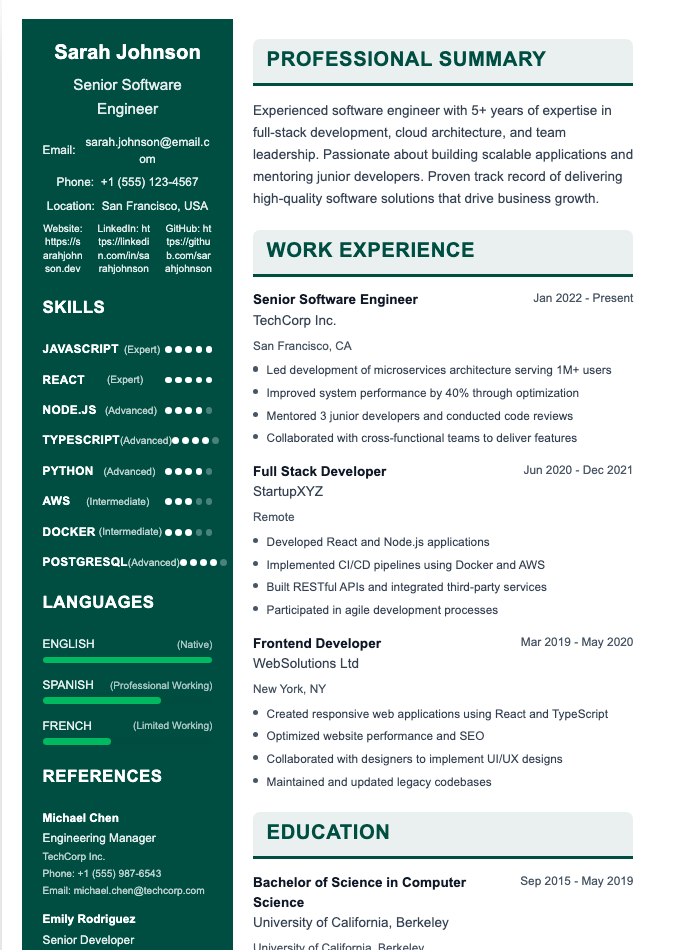
- A narrow column (sidebar), usually on the left or right, for short, scannable information: contact details, skills, languages, certifications, and sometimes education
- A wider main column for content that needs space: your summary and work experience
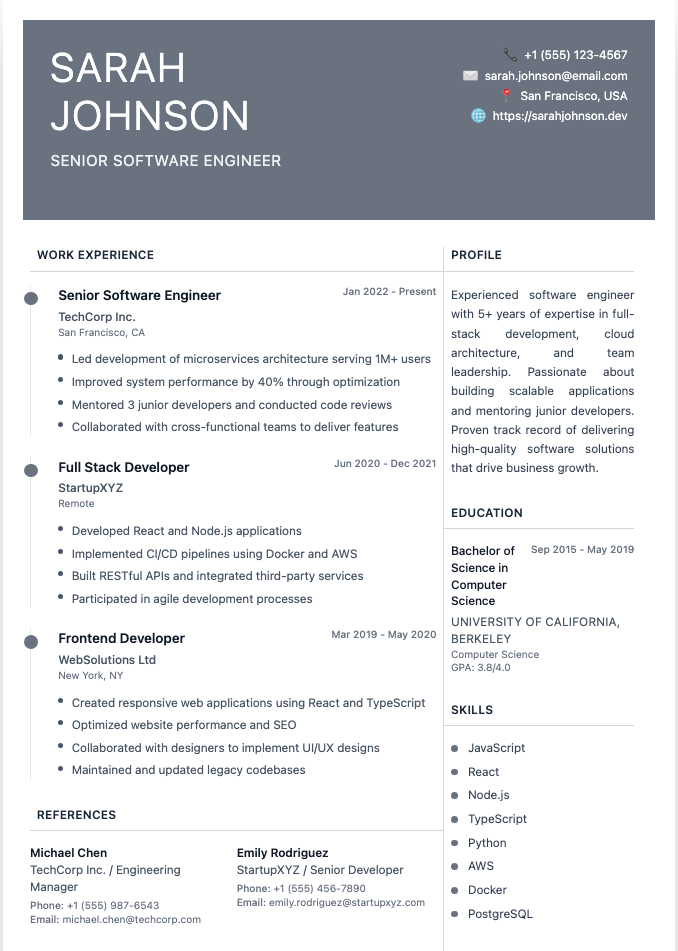
Here's an example of a two-column layout:
Pros of a Two-Column Resume
- Fits more on one page. Helpful for experienced candidates with a lot of skills and certifications.
- Easy to scan. Recruiters can spot skills and contact details at a glance.
- Forces concise writing. Narrow columns discourage long, rambling bullets.
- Looks modern and polished. Especially effective for creative, design, marketing, and tech roles.
- Visual hierarchy. Separating "quick facts" from "detailed experience" can make the page feel organized.
Cons of a Two-Column Resume
- ATS parsing problems. Many applicant tracking systems read left to right across the whole page, which can mix sidebar text with your job descriptions. Contact details in a sidebar header may be missed entirely.
- Less room for experience. The main column is narrower, so your most important content gets less space.
- Can look cluttered if you try to fit too much.
- Recruiter preference. Some recruiters, especially in traditional industries like finance, law, and government, prefer a conventional single-column layout.
- Formatting breaks. Columns built with tables or text boxes can shift when converted between Word, Google Docs, and PDF.
Learn more about how parsing works in what is a resume parser.
One-Column vs. Two-Column Resume
One-column resume
- Most ATS-friendly
- More space for detailed experience
- The format recruiters see most often
- Best for online applications, traditional industries, and anyone with a long work history
Two-column resume
- More visually distinctive
- Fits more short information on one page
- Riskier with ATS
- Best for creative roles, networking, and resumes handed directly to people
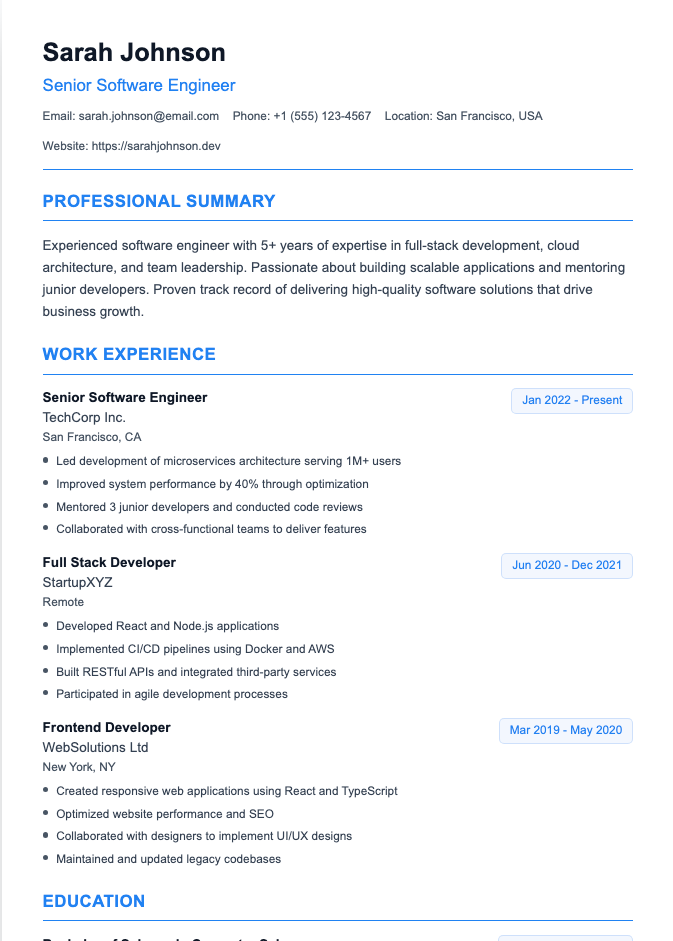
Our recommendation: default to one column for online applications. Keep a two-column version for when a human will see it first. See our ATS-friendly resume templates.
When Should You Use a Two-Column Resume?
Good times to use one:
- Applying for design, creative, marketing, or startup roles where visual polish matters
- Emailing your resume directly to a hiring manager or recruiter
- Networking events, career fairs, and interviews, where you hand over a printed copy
- Your portfolio website or LinkedIn Featured section
- When you're confident the employer doesn't use an ATS (often small businesses)
When to stick with one column:
- Applying through online job portals (Workday, Taleo, Greenhouse, iCIMS)
- Traditional industries like finance, law, healthcare, and government
- Roles where you need room for detailed experience, like senior or technical positions with complex projects
- Any time you're unsure
What to Put in Each Column
Sidebar (narrow column):
- Contact information (name can span both columns at the top)
- Skills and tools
- Certifications
- Languages
- Education (if short)
- Links: LinkedIn, portfolio, GitHub
Main column (wide):
- Professional summary
- Work experience
- Projects
- Awards or publications (if detailed)
Keep the sidebar short and scannable. If it's longer than the main column, rebalance.
How to Make a Two-Column Resume ATS-Safer
Most guides just say "two-column resumes aren't ATS-friendly." Here's how to reduce the risk if you use one anyway:
- Put your name and contact details at the top of the page, spanning both columns, not in a sidebar or header.
- Use built-in column formatting or a well-built template, not text boxes. Text boxes are the most likely to be skipped.
- Avoid putting critical keywords only in the sidebar. Repeat key skills in your experience bullets.
- Use standard section headings like "Skills" and "Experience."
- Skip icons and skill bars, which ATS can't read.
- Run the copy-paste test: select all text in your PDF and paste it into a plain text editor. If the text comes out in a logical order, you're probably fine. If your job titles are mixed with your skills list, switch to one column.
See ATS score for more ways to check your resume.
How to Create a Two-Column Resume
- Resume builders: many offer two-column templates. Our templates include both one- and two-column designs.
- Microsoft Word: use Layout → Columns, or a two-column template; avoid text boxes. See Word resume templates.
- Google Docs: use Format → Columns, or a template with a two-column layout. See Google Docs resume templates.
- Canva: many two-column designs, but check ATS readability carefully. See our Canva resume review.
Two-Column CV Tips
In the UK and Europe, two-column CVs are common, especially in creative and tech fields. The same rules apply: keep critical details in the main column, and use a single-column version for online application systems. A two-page CV can often give you the space you'd otherwise squeeze into a sidebar.
Frequently Asked Questions
Are two-column resumes ATS-friendly?
Not always. Some modern systems handle them, but many still read columns out of order or skip sidebars. A single-column resume is the safest choice for online applications.
Do recruiters like two-column resumes?
Some do, especially in creative and tech fields. Others, particularly in traditional industries, prefer a standard single-column format. Readability matters more than style.
Should I use one column or two on my resume?
Use one column for online job applications and traditional industries. Use two columns when a person will see your resume directly or when design is part of the job.
What goes in the left column of a two-column resume?
Short, scannable details: contact information, skills, certifications, languages, education, and links.
Is a two-column resume good for students?
It can be for networking and career fairs, but for online applications, a single-column resume is safer and gives more room for projects and experience.
Choose the Right Layout in Minutes
Our Resume Builder offers both single-column and two-column templates, so you can keep an ATS-safe version for job portals and an eye-catching one for the people you meet.