

Quick answer: A Flow CV resume template is one of 100+ customizable designs in FlowCV, a browser-based resume builder from Austria. The free plan gives you one resume and one cover letter, every template, full design control, and unlimited watermark-free PDF downloads. Pro ($60 a year) adds unlimited resumes and AI writing tools.
FlowCV has a reputation for one thing: a free plan that's actually free. No watermark ambush at the download button, no "your trial has ended" email the morning of your deadline. It's like finding a parking spot right outside the building. You don't quite trust it at first.
This FlowCV review covers the templates, the editor, ATS compatibility, pricing, pros and cons, and who should use it (or skip it).
Note: Features and pricing below come from FlowCV's own website as checked in October 2026, cross-checked with independent reviews. Check current pricing before you upgrade.
What Is FlowCV?
FlowCV is an online resume and cover letter builder made by a small team of indie developers based in Austria (the company is Uniqkorn Creative GmbH). It says it's trusted by more than 6.9 million job seekers.
The workflow, per FlowCV:
- Choose a template (or design your own and save it)
- Add your experience, typing it in or importing an existing resume
- Customize layout and design
- Download PDFs, as many times as you like
Your draft saves automatically to your account, so you can come back and update it before each application.
FlowCV Templates: What You Get
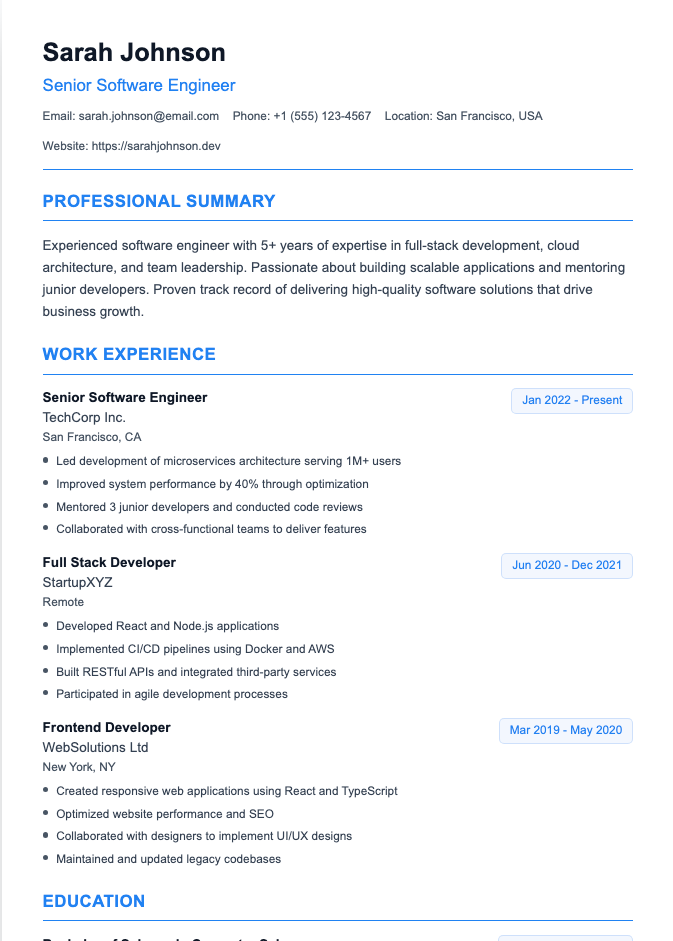
FlowCV advertises 100+ free resume templates (some older reviews say 50+, so the library has grown). They're grouped into categories, with many designs appearing in more than one:
- Simple: clean, traditional layouts for conservative industries
- Modern: contemporary designs for tech and newer fields
- Creative: more distinctive designs for creative roles
- Photo: layouts with space for a headshot (common in parts of Europe)
- Compact: denser layouts for experienced professionals
- First Job: layouts for students and recent graduates
Every Flow CV resume template is available on the free plan. That's the big differentiator: many builders lock their best designs behind a paywall.

How customizable are FlowCV templates?
Very. According to FlowCV, you can adjust:
- Fonts, colors, and spacing
- Layout, including one- and two-column designs
- Section order (drag and drop)
- Font size, to fit content onto your pages
- Page size: A4 or US Letter
You can also switch templates without losing your content, which makes it easy to try a few looks. One independent review notes that free users get a smaller set of colors and fonts than paid users, so if you want a specific font, check before you commit.
Are FlowCV templates ATS-friendly?
FlowCV says all its templates are built for ATS compatibility, with real text and standard section headings, and recommends a simple one-column template as the safest option for older systems. That's sound advice.
Independent reviewers generally agree the formatting is clean. Still, every applicant tracking system parses files a little differently, and one user complaint cited by a reviewer mentioned problems with Workday. If you're applying mostly through online portals, pick a single-column template and run the copy-paste test from our guide to how resume parsers work.
How to Pick the Right Flow CV Resume Template
With 100+ options, choice paralysis is real. A quick filter:
- Applying online to corporate roles? Choose a Simple single-column template. Parsers and recruiters both like predictable.
- Designer, marketer, or creative role? A Creative or Modern template can work, but keep the text readable and skip graphics that replace words.
- Lots of experience? A Compact template helps you fit more without shrinking the font to ant size.
- Student or first job? The First Job category leaves room for education and projects. See how to write a resume with no experience.
- Applying in the US? Skip the Photo templates. Headshots are not expected on US resumes.
Whichever template you choose, the content matters more than the font. Our guide to resume sections order helps you structure it.
FlowCV Features Beyond Templates
- Resume import: upload an existing resume (PDF, DOCX, or image) or paste text to fill your sections automatically. Free users get 3 imports; Pro is unlimited.
- Cover letters: a matching cover letter builder, with one cover letter on the free plan.
- AI writing and translation tools: included with Pro only.
- Job Tracker: keep tabs on applications (Pro).
- PDF export: print-ready PDFs with no watermark or FlowCV branding. FlowCV doesn't advertise a Word (DOCX) download, which matters if an employer specifically asks for one.
FlowCV Pricing (Free vs Pro)
FlowCV's pricing page (October 2026) lists two plans:
Free ($0, free forever, no credit card):
- 1 resume and 1 cover letter
- Unlimited PDF downloads, no watermarks or branding
- All resume templates and full design customization
- 3 content imports
Pro ($5 per month billed yearly, $60 per year):
- Everything in Free
- Unlimited resumes and cover letters
- Unlimited imports
- Job Tracker
- AI writing and translation tools
Pro is also available with monthly and quarterly billing, at a higher per-month price than the yearly plan. Other details from FlowCV's FAQ:
- 14-day money-back guarantee on Pro
- Cancel anytime, and you keep Pro until the end of your billing period
- If you downgrade, your oldest saved resume and cover letter stay editable; the rest are stored until you upgrade again
- Verified university students get 25% off Pro for up to three years
Some older reviews mention a "Basic" tier; it doesn't appear on the current pricing page.
FlowCV Pros and Cons
Pros
- Genuinely usable free plan: every template, full customization, unlimited watermark-free PDFs
- Large template library with real variety
- Fast, intuitive editor with live preview and drag-and-drop sections
- Low Pro price on the yearly plan
- Privacy-conscious (FlowCV highlights GDPR compliance)
Cons
- Only one resume on the free plan, so tailoring separate versions for different roles means overwriting or upgrading
- No AI writing on the free plan
- No job-description matching or keyword tailoring, per independent reviews
- PDF only, with no advertised Word export
- Two-column and creative designs carry more ATS risk than single-column ones
Is FlowCV Worth It?
For a lot of people, yes. If you need one polished resume and you're happy writing your own content, FlowCV's free plan is hard to beat.
It's less ideal if you're applying to many different roles and want to tailor your resume to each job description with AI help. You'd need Pro for multiple versions and AI tools, and even then reviewers note it doesn't analyze job postings. (Your resume should change a little for every job. Your template doesn't have to.)
FlowCV Alternatives
- Google Docs templates: free and flexible, if you don't mind manual formatting. See our Google Docs resume templates.
- Canva: more design-heavy options; see our Canva AI resume builder review.
- Teal or Rezi: stronger on job matching and ATS keyword targeting. See our Teal review.
- Our AI Resume Builder: ATS-friendly templates plus AI help writing summaries and bullet points, and tailoring to each job description.
Compare free plan limits and download terms on each tool's own site, since they vary a lot.
Frequently Asked Questions
Is FlowCV really free?
Yes, for one resume and one cover letter. The free plan includes all templates, full customization, and unlimited PDF downloads with no watermark, and FlowCV says there's no trial period or credit card required. You pay only for extra documents, unlimited imports, the Job Tracker, and AI tools.
How much does FlowCV Pro cost?
FlowCV Pro costs $60 per year, which works out to $5 per month on yearly billing. Monthly and quarterly billing are available at a higher per-month rate, and there's a 14-day money-back guarantee.
How many templates does FlowCV have?
FlowCV advertises 100+ resume templates across categories like Simple, Modern, Creative, Photo, Compact, and First Job. All of them are available on the free plan.
Are FlowCV resumes ATS-friendly?
FlowCV says its templates use real text and standard headings for ATS compatibility, and recommends a one-column template for older systems. Stick to a simple layout for online applications and test your PDF before sending.
Can I download a FlowCV resume in Word format?
FlowCV advertises PDF downloads only, and its templates aren't offered as Word files. If a job asks for a .docx, you may need to rebuild the resume in a word processor or use a tool that exports Word files.
Is FlowCV good for students?
Yes. It has a First Job template category, the free plan covers a single resume well, and verified university students get 25% off Pro for up to three years.
Your Template Is the Frame, Not the Picture
A beautiful template can't rescue weak bullet points. If you want help writing a sharp summary and results-driven experience section, try our AI Resume Builder, then pick the layout that fits your industry.