

Quick answer: A template CV Illustrator file is an editable vector layout (.ai or .eps) built in Adobe Illustrator that gives you pixel-level control over typography, grids, and visual hierarchy. While Illustrator is popular for portfolio PDFs, you must keep text layers live, never convert fonts to outlines, and use a clean column structure so applicant tracking systems (ATS) can read your resume.
Adobe Illustrator is an incredible tool for brand identities, vector icons, and poster typography. It is also where thousands of designers go to build a resume that looks like a museum piece—right before an automated job portal scrambles their work history into modern poetry.
If you are searching for a template CV Illustrator layout or wondering how to make a resume in Illustrator without sabotaging your job applications, this guide covers both sides: step-by-step vector setup, a copy-ready structure you can paste into your artboard, and honest ATS caveats every creative should know.
Should You Use a Template CV Illustrator Layout?
An Adobe Illustrator resume template makes sense when visual presentation is part of the job evaluation itself—such as graphic design, illustration, art direction, brand design, or architecture—and when you send your PDF directly to a creative director or studio lead.
However, when you apply through corporate job portals (Workday, Greenhouse, Lever, or Taleo), a heavy vector layout can backfire. Many creative professionals use a two-resume strategy:
- The designed Illustrator PDF: For direct email outreach, portfolio downloads, and in-person interviews where a human looks at the page first.
- The ATS-safe resume: A clean, single-column text-first document for online application portals. (See our creative director resume and creative resume examples and format guides.)

How to Make a Resume in Illustrator (Step-by-Step Setup)
Whether you build from scratch or customize an Illustrator CV template free download, how you set up the file determines whether your PDF is readable or a maintenance headache.
1. Artboard size and color mode
Open Illustrator and go to File > New:
- Dimensions: Choose US Letter (8.5 x 11 in) for North America or A4 (210 x 297 mm) for Europe and international applications.
- Color Mode: Choose RGB for digital PDFs viewed on screens, or CMYK (300 ppi) if printing copies for portfolio reviews.
- Margins: Turn on rulers (View > Rulers > Show Rulers) and set at least a 0.5-inch (12.7 mm) safe margin around all four edges.
2. Use Area Type boxes—never Point Type—for body copy
Clicking once with the Type Tool (T) creates Point Type (a single line that expands infinitely unless you add manual line breaks). Clicking and dragging creates Area Type (a proper text frame where paragraphs wrap naturally).
Always use Area Type boxes for your summary, work experience, and bullet points. If you use Point Type for bullets, editing a single word six months from now will force you to manually adjust every line break below it—a special kind of torture nobody needs before coffee.
3. Set up Paragraph Styles and clean reading order
Open Window > Type > Paragraph Styles to save consistent styles:
- Name / Header: 20–24 pt, bold sans-serif or display serif
- Section Headings: 11–13 pt, bold, with 8–10 pt space before
- Job Title / Subhead: 10.5–11.5 pt, semibold
- Body & Bullet Text: 9.5–10.5 pt, regular weight, with 13–15 pt leading
When a resume parser reads an Illustrator PDF, it often reads objects in the order they appear in the Layers panel. Keep your text on a single clean layer ordered from top to bottom, or thread your text frames (Type > Threaded Text > Create).
Copy-Ready Template Structure for Adobe Illustrator
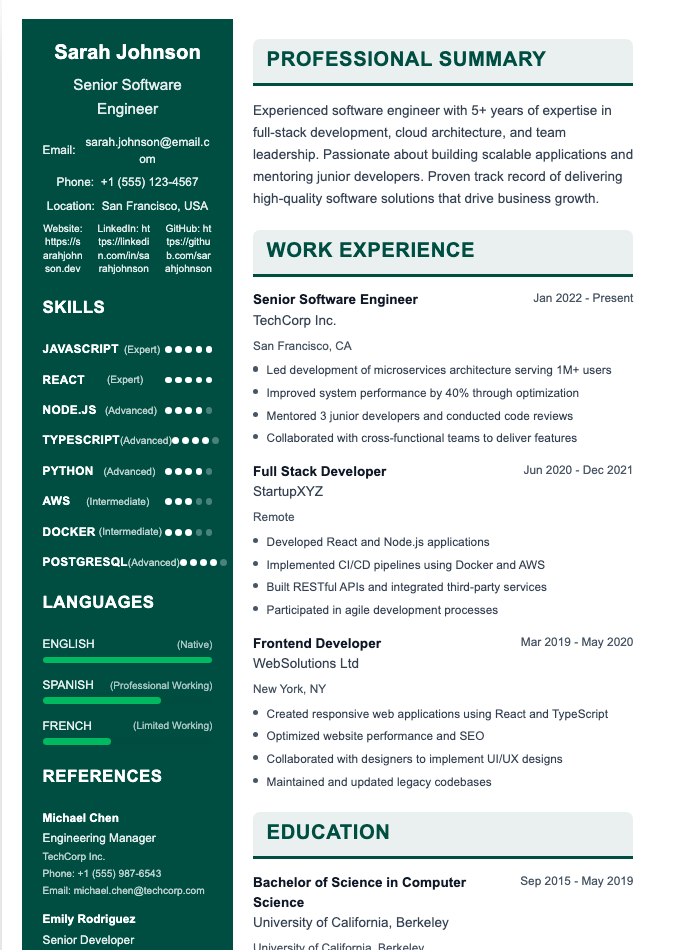
Use standard section titles on your artboard so both humans and software immediately recognize each block:
[FULL NAME]
[Title: e.g., Senior Graphic Designer & Brand Illustrator]
[City, State] • [Phone] • [Email] • [Portfolio URL] • [LinkedIn URL]PROFESSIONAL SUMMARY
[2–3 sentences summarizing your years of experience, core design specialties, software stack, and a standout business or creative outcome.]WORK EXPERIENCE
[Job Title] — [Company / Studio Name], [Location] ([Month Year] – [Present])
- [Led visual identity redesign across web and packaging for 12 consumer brands, lifting client retention by 25%.]
- [Built modular vector illustration library and Figma component kit, cutting campaign turnaround from 10 days to 3 days.]
- [Art-directed print and digital launch assets, collaborating with copywriters, UX researchers, and print vendors.]
SKILLS & TOOLS
- Design Software: Adobe Illustrator, InDesign, Photoshop, After Effects, Figma
- Specialties: Vector Illustration, Typography, Brand Identity Systems, Print Prepress, Design Systems
EDUCATION
B.F.A. in Graphic Design — [University Name], [Graduation Year]
Honest ATS Caveats: Why Illustrator Resumes Get Rejected
Before uploading an Illustrator PDF to an online job portal, watch out for these five traps covered in our guide to the truth about ATS:
- Outlining fonts (
Create Outlines): In print work, designers pressCmd+Shift+O(Ctrl+Shift+O) to turn text into vector paths. On a resume, never outline your text. Outlined text is just shapes—to an ATS, your resume is completely blank. - Skill rating bars and charts: Replacing "Adobe Illustrator — Expert" with vector stars or an 85% progress bar looks sleek, but parsers ignore vector shapes—and hiring managers wonder what the missing 15% of Illustrator is.
- Unlabeled vector icons: Putting contact details inside clipping masks or relying on icons without plain text can stop parsers from reading your email and phone number.
- Scrambled multi-column order: Unthreaded sidebar and main-column boxes can cause the PDF text stream to interleave lines across columns.
- Giant file sizes: Save your master
.aifile first, then export via File > Save a Copy > Adobe PDF and uncheck Preserve Illustrator Editing Capabilities to keep your PDF well under portal upload limits.
The 10-Second Plain-Text Test: Open your exported PDF, press Select All (Cmd+A / Ctrl+A), copy, and paste into a blank plain-text document. If every heading, date, and bullet pastes in the right order, your text layer is healthy. (Also see our Canva AI resume builder review for how other design tools compare.)
Where to Find Free & Paid Adobe Illustrator Resume Templates
- Adobe Stock & Adobe Express: Includes free
.aiand.aitvector resume layouts inside the Creative Cloud ecosystem. - Freepik & Vecteezy: Large libraries of free Illustrator CV templates (
.aiand.eps), though you should strip out decorative skill bars before using them. - Envato Elements, Creative Market, & BrandPacks: Curated paid bundles with matching cover letters and paragraph styles.
Frequently Asked Questions
Is Adobe Illustrator or InDesign better for making a resume?
InDesign is generally better for multi-page documents and text-heavy layouts because it is built for page layout and typography. However, Adobe Illustrator works well for a one-page resume if you use Area Type frames and Paragraph Styles.
Are Adobe Illustrator resumes ATS-friendly?
They can be, provided you keep all text live (never converted to outlines), use standard fonts, stick to standard section headings like "Work Experience" and "Education," and verify reading order by copying and pasting the PDF into plain text.
How do I save an Illustrator resume as a small PDF?
Save your master .ai file first. Then go to File > Save a Copy, choose Adobe PDF, and uncheck Preserve Illustrator Editing Capabilities so your live text stays crisp without heavy private editing data.
Should I convert text to outlines on my Illustrator CV?
No. Converting text to outlines turns every letter into a vector shape, making your resume unreadable to applicant tracking systems and disabling clickable links. Embed the fonts when saving as a PDF instead.
Can I open an Illustrator resume template without Creative Cloud?
If saved as a PDF-compatible .ai or .eps file, programs like Affinity Designer or Inkscape can usually open it, though complex text styles may shift. For quick edits without design software, use a browser-based resume builder.
Want a Clean Design Without Fighting Text Boxes?
You shouldn't have to spend two hours nudging bounding boxes by 0.5 pt just to add a new bullet point. Our Resume Builder gives you clean, modern typography that passes ATS parsers automatically—so you can save your Illustrator hours for your actual portfolio.