

Quick answer: An ATS friendly resume is a resume that applicant tracking software can read correctly and match to a job. To make one, use a single-column layout, standard section headings, a common font, real text instead of graphics, and keywords from the job description that reflect your actual experience. Save it as a PDF or .docx unless the employer asks otherwise.
You spent an evening making your resume look great. Then an online application turned it into a puzzle: your job titles in the wrong boxes, your phone number gone, and "Skills" filed under "Hobbies." Somewhere, a printer is laughing.
That's the classic sign of a resume that isn't ATS-friendly. The good news is that the fix is mostly about structure, not starting over. This guide explains what "ATS-friendly" really means, the nine steps to get there, and a quick test to confirm it worked.
For the content side, Harvard's career office has a solid guide to creating a strong resume (opens in a new tab). This post focuses on making that content readable by the software that sees it first.
What Is an ATS-Friendly Resume?
An ATS-friendly resume (also called an ATS compliant, ATS optimized or ATS format resume) is one that an applicant tracking system can parse without errors and match to the job you're applying for.
Those are two separate jobs:
- Parsing: the ATS reads your file and pulls out your name, contact details, job titles, employers, dates, education and skills into fields. If your layout confuses it, information lands in the wrong place or disappears.
- Matching: recruiters search and filter candidates by skills, titles and other keywords. If your resume doesn't use the words they search for, you're harder to find.
A resume can look beautiful and fail both. A plain one can pass both and still read well to a human. That second one is the goal. For a deeper look at the parsing step, see what a resume parser does.
Why ATS-Friendly Formatting Matters
Most mid-size and large employers use an ATS such as Workday, Greenhouse, iCIMS, Lever or Taleo to collect applications. Recruiters then work inside that system, searching and sorting candidates.
The ATS usually doesn't "reject" you on its own. More often, a messy parse makes your profile look incomplete, or missing keywords push you down a recruiter's search results. Either way, a human never gets a good look. We bust the bigger myths in the truth about ATS.
Upload your CV and get your ATS score in 10 seconds
Paste the job description, upload your resume, and see exactly what the ATS will flag.
Drop your resume here
or click anywhere to browse
Takes about 10 seconds · No account needed
What we check
Keyword match
Skills the job asks for vs. what's on your resume
ATS-readable formatting
Layout that survives parsing by hiring software
Action verbs & impact
Strong, measurable bullet points
Common red flags
Issues that get resumes auto-rejected
How to Make an ATS-Friendly Resume in 9 Steps
Follow these in order. Steps 1 to 5 fix parsing; steps 6 to 9 fix matching.
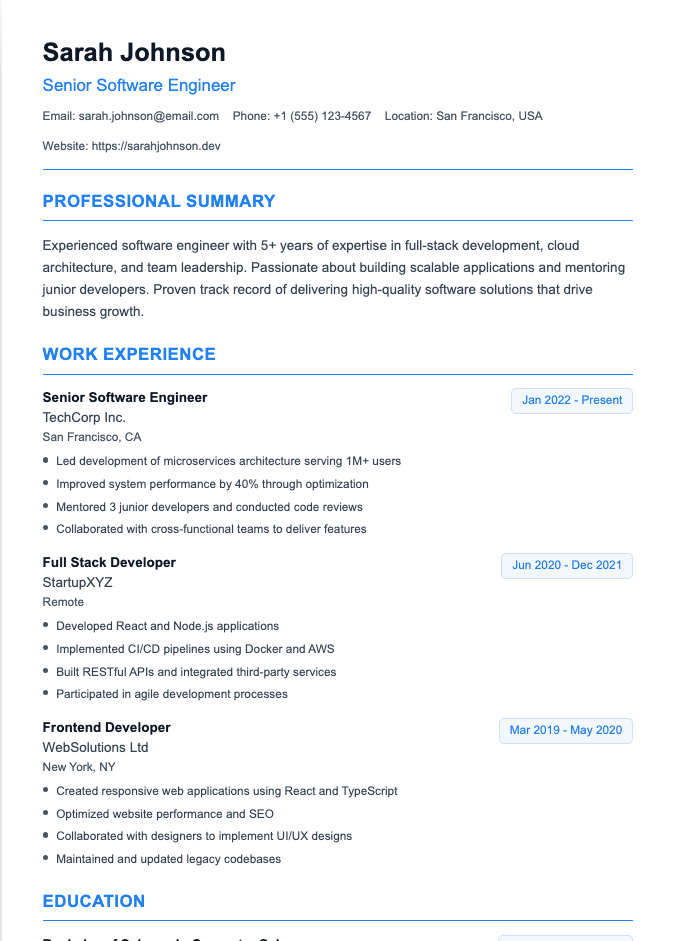
1. Use a single-column layout
One column is the safest structure. Many parsers read left to right across the whole page, so a two-column design can blend your sidebar skills into your job history. If you love a two-column look, test it carefully (see step 9).
2. Use standard section headings
Software looks for familiar labels. Use these:
- Summary or Professional Summary
- Experience or Work Experience
- Education
- Skills
- Certifications, Projects, Volunteer Experience (if relevant)
Creative headings like "Where I've Been" or "My Toolbox" are charming to humans and confusing to parsers.
3. Keep contact details in the body, not the header
Some systems skip the document header and footer. Put your name, phone, email, city and LinkedIn URL as plain text at the top of the page body.
4. Avoid tables, text boxes, icons and images
Tables and text boxes can be read out of order or skipped. Icons for phone and email are invisible to software, and a skills bar chart says nothing a parser can read. Write "Advanced Excel" instead of drawing four out of five stars.
5. Choose a common font and simple formatting
Use a standard font like Calibri, Arial, Garamond or Georgia at 10 to 12 points. Bold, italics and simple bullets are fine.
6. Match your job title to the posting where it's honest
If the posting says "Customer Success Manager" and your title was "Client Happiness Lead" for the same work, add the standard title in your summary or in brackets. Recruiters often search by job title first.
7. Use keywords from the job description
Read the posting and list the hard skills, tools, certifications and responsibilities it repeats. Then use the ones you genuinely have, in the same wording, in your summary, skills and experience bullets. Write out acronyms once with the full term, like "search engine optimization (SEO)." If a posting is thin, the Department of Labor's O*NET OnLine (opens in a new tab) lists the typical skills and tools for each occupation.
8. Use standard date formats
Write dates as "Mar 2022 to Present" or "03/2022 to Present" and keep the format consistent. Put each job's dates on the same line as the job title or employer so the parser connects them.
9. Save in the right file type and test it
A text-based PDF or a .docx file works for most modern systems. If the posting asks for a specific format, use that. Our guide on whether to send a resume as PDF or Word covers the edge cases. Then test your file (see the next section).
How to Check If Your Resume Is ATS-Friendly
You can check most issues in five minutes without any special software.
- Copy and paste test: open your PDF, select all, and paste into a plain text editor. If the text comes out in the right order with nothing missing, a parser will probably read it too.
- Application preview test: many job portals parse your upload and pre-fill the form. Check whether your titles, employers and dates landed in the right fields.
- Keyword test: list the top ten skills from the posting and search your resume for each. Missing ones that you genuinely have should be added.
- Score it: run your resume through a free checker for a quick read on structure and keyword match. Our guide to ATS scores explains what a "good" number means.

ATS-Friendly Resume Example: Before and After
Here's how one experience entry changes when you make it ATS-friendly. The content stays true; the structure and wording change.
Before (hard for ATS to read):
[Icon] ACME CORP | 2021-now Client Happiness Lead Made customers happy, fixed stuff, worked with the team on cool projects ★★★★☆ Zendesk
After (ATS-friendly):
Customer Success Manager (Client Happiness Lead), Acme Corp, Denver, CO Jan 2021 to Present
- Managed a portfolio of 45 mid-market accounts and ran quarterly business reviews
- Resolved escalated support tickets in Zendesk and documented fixes in the help center
- Worked with product and sales teams to reduce onboarding time for new clients
The "after" version uses a standard title, consistent dates, plain bullets and real skills from a typical customer success posting. The icon and star rating are gone, and nobody misses them.
ATS-Friendly Resume Format: Quick Rules
If you only remember one list about building an ATS friendly resume, make it this one.
- Layout: single column, left-aligned, standard margins (0.5 to 1 inch)
- Headings: Summary, Experience, Education, Skills
- Font: common font, 10 to 12 point body text
- Content: real text only, no text inside images
- Contact info: in the body, not the header or footer
- Dates: one consistent format
- File: text-based PDF or .docx, named like "Jane-Doe-Resume.pdf"
- Length: one page early in your career, two pages for most experienced candidates
Need a ready-made layout? Our ATS-friendly resume templates give you three free options that follow these rules.
Common ATS-Friendly Resume Mistakes
- Keyword stuffing: pasting the job description in white text or repeating "project management" twenty times. Recruiters see it, and it looks like a trick because it is one.
- Listing skills you don't have: it might help you get found, but it won't survive the interview.
- Using a graphic-heavy template for online applications: save the designed version for networking and in-person handoffs.
- Putting key details in the header: if the parser skips it, the recruiter can't call you.
- Abbreviations only: "PMP" alone may miss a search for "Project Management Professional." Use both once.
- Not testing the file: the copy-and-paste test takes thirty seconds and catches most problems.
Frequently Asked Questions
What makes a resume ATS-friendly?
A resume is ATS-friendly when software can read it accurately and match it to the job. That means a single-column layout, standard headings like Experience and Skills, a common font, no tables or graphics, contact details in the main body, and job-relevant keywords that reflect your real experience.
Is a PDF resume ATS-friendly?
Yes, a text-based PDF is ATS-friendly in most modern systems. Problems happen with scanned PDFs or PDFs made from images, because there's no real text to read. If a job posting specifically asks for a Word document, send a .docx instead. Test any PDF by copying its text into a plain editor.
Can a two-column resume be ATS-friendly?
Some two-column resumes parse fine, but many don't, because the software may read across both columns and mix up sections. A single-column resume is the safer choice for online applications. If you use two columns, test the file with a copy-and-paste check and an ATS preview first.
How do I know if my resume is ATS compliant?
Paste your resume's text into a plain text editor and check that everything appears in the right order. Then compare your skills to the job description and run a free scan. You can upload your resume to our resume builder for a free score with no signup.
Do all companies use ATS?
Not all companies use an ATS, but most medium and large employers do, along with many staffing agencies. Small businesses may still review resumes by email. Since you can't always tell, it's smart to make every resume ATS-friendly, because the same formatting is also easy for humans to scan.
Build an ATS-Friendly Resume in Minutes
An ATS-friendly resume is simple on purpose: one column, clear headings, honest keywords and a file the software can read. Fancy can wait for your wedding invitations.
Start with one of our clean resume templates, or upload your current resume to our AI Resume Builder for a free ATS score and the top three fixes.