

Quick answer: Use 10.5 to 12 point font for your resume's body text, with 11 or 12 pt the safest choice. Make section headings 14 to 16 pt (or about 2 pt larger than your body text), and your name 16 to 22 pt. Never go below 10 pt, even to fit one page. Exact sizes depend on the font: Garamond looks smaller than Arial at the same size, so preview your resume before sending it.
Font size is the Goldilocks problem of resume writing. Too small and recruiters squint (or don't bother). Too big and your resume looks like a children's book. Here's how to get it just right.
Resume Font Size Guide
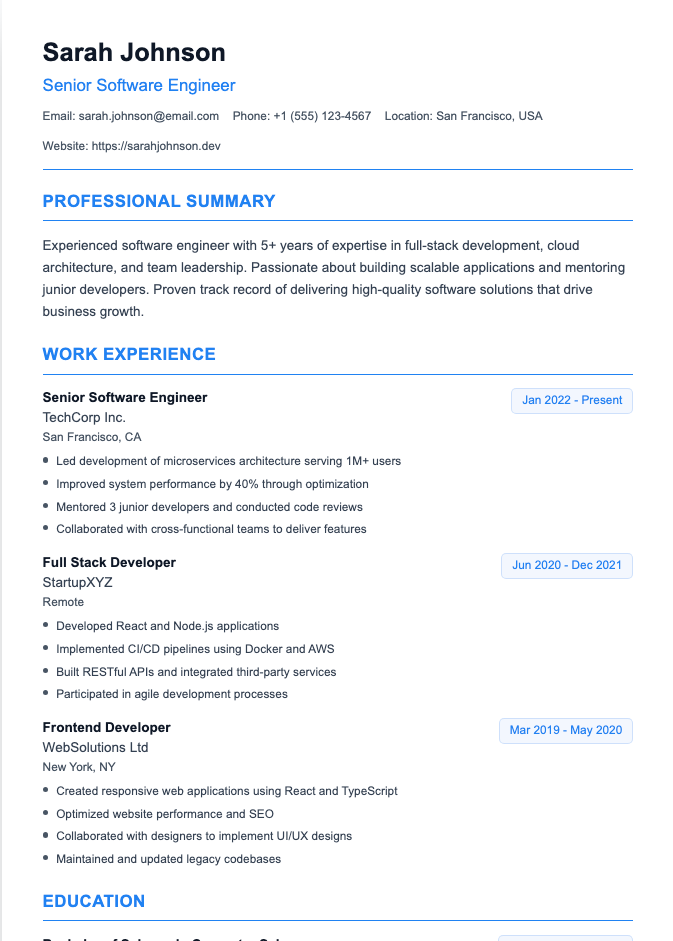
- Your name: 16–22 pt. Big enough to stand out, not so big it eats the page.
- Section headings: 14–16 pt, or 2 pt larger than your body text, usually in bold.
- Job titles and company names: same size as body text or 1 pt larger, in bold.
- Body text and bullet points: 10.5–12 pt.
- Contact details: same as body text, or 1 pt smaller.
Keep it consistent: every heading the same size, every bullet the same size.
Best Fonts for a Resume
Choose a clean, professional font that's easy to read on screen and in print, and that applicant tracking systems can parse:
- Calibri: modern and clean; the default in many Word templates
- Arial: simple, highly legible sans serif
- Helvetica: polished and modern, common on Mac
- Georgia: a readable serif designed for screens
- Cambria: a professional serif that works well in print
- Garamond: elegant and compact, great for fitting more text
- Times New Roman: traditional and safe, though a little dated
Avoid: Comic Sans, Papyrus, script or handwriting fonts, and anything decorative. They're hard to read and can confuse ATS software.
Use one font for the whole resume, or two at most (one for headings, one for body text).
Font Size by Font: A Quick Cheat Sheet
Not all fonts are the same size at the same point size. Here's where each tends to look best for body text:
- Arial, Helvetica, Verdana: 10.5–11 pt (they run large)
- Calibri: 11–12 pt
- Georgia, Cambria: 11–12 pt
- Times New Roman: 12 pt
- Garamond: 12 pt (it runs small)
If you switch fonts, re-check your sizes. A resume that looks perfect in Calibri 11 may look cramped in Garamond 11.
Line Spacing and Margins
Font size is only part of readability:
- Line spacing: 1.0 to 1.15 for body text
- Space between sections: a little extra (6–12 pt) so sections are easy to spot
- Margins: 0.75 to 1 inch on all sides; never below 0.5 inch
Can You Use 10 pt Font on a Resume?
You can, but treat 10 pt as the absolute minimum, and only with fonts that run large, like Arial. Recruiters read resumes quickly, often on screens, and tiny text is a fast way to get skipped.
How to fit one page without shrinking your font
Most guides just say "don't go below 10 pt." Here's what to do instead:
- Cut older or less relevant experience. See how far back a resume should go.
- Trim bullets to one or two lines and cut weak ones.
- Shorten your summary to two or three sentences.
- Combine short sections, like certifications and skills.
- Reduce margins slightly, to no less than 0.5 inch.
- Accept two pages if you genuinely have 10+ years of relevant experience. See how long a resume should be.
Formatting Tips That Help Readability
- Bold job titles and section headings
- Avoid underlining, which looks like a link
- Limit ALL CAPS to section headings
- Skip italics for long passages
- Use black or dark gray text on a white background
- Save as a PDF so your fonts and sizes stay exactly as you set them
For a full layout guide, see what a resume should look like. Writing a cover letter too? See our cover letter font size and spacing guide.
Frequently Asked Questions
What size font should a resume be?
10.5 to 12 pt for body text, 14 to 16 pt for headings, and 16 to 22 pt for your name.
Is 11 pt font OK for a resume?
Yes. 11 pt is one of the most common and readable resume font sizes, especially with fonts like Calibri or Arial.
What is the best font for a resume?
Calibri, Arial, Helvetica, Georgia, Cambria, Garamond, and Times New Roman are all safe, professional choices.
Should I use the same font throughout my resume?
Yes, ideally. One font with different sizes and bold for hierarchy looks cleanest. If you use two, keep them simple and complementary.
Does font size affect ATS?
Not directly, as ATS reads text regardless of size. But unusual fonts, text in images, or very small text can cause problems, so stick to standard fonts and sizes.
Get the Formatting Right Automatically
Our Resume Builder sets professional fonts, sizes, and spacing for you, so your resume is easy to read and ATS-friendly from the start.